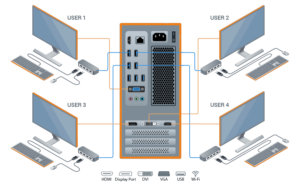
 JoinCloud creates up to 12 independent Windows workplaces on the base of a single PC. It is the Ideal solution for cost-effective computerization in homes, schools, companies, factories, and government organizations
JoinCloud is a purely software multiseat solution without the need of zero client hardware!
Here are some of its key features:
Multiple Workstations: Create up to 12 independent workstations based on a single PC by adding monitors, keyboard & mice. This is particularly useful for environments like schools, offices, or internet cafes where multiple users need computer access without the cost of additional hardware.
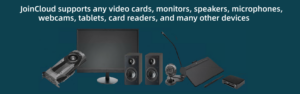
Hardware Efficiency: Joincloud supports the use of multiple video cards or even multiple outpoints from a single card, enabling each user to have their own display. It’s compatible with VGA, DVI, HDMI, and Display Port video cards.
User Experience: Each user operates as if they have their own computer, with individual desktops, taskbars, and system resources. This includes personalized settings and independent operation, ensuring privacy and autonomy for each user.
Resource Allocation: Users can share common hardware resources like printers and scanners while having dedicated peripherals like keyboard and mice. You can also assign specific USB devices to individual users.
Software Compatibility: While JoinCloud generally supports running multiple instances of software, some programs might not be fully compatible or might refuse to run multiple instances. This can vary depending on the software in question.
Ease of Use: The software features a straight forward installation and configuration process. The control panel allows for easy management of devices, video cards, and audio settings for each workplace.
Network Features: JoinCloud includes network capabilities like proxy settings, although some users might not utilize these features. It also manages shared IP address usage among the workplaces.
Compatibility with Windows: JoinCloud is compatible with various versions of Windows from Windows 7 to Windows 11 and Windows Server 2016/2019/2022/2025, offering broad platform support.
Cost-Effective: By reducing the need for additional PCs, JoinCloud offers a cost-effective solution for creating multiple workstations. This is especially highlighted in educational settings or for businesses looking to economize on hardware.
Zero-Client Software: It allows for the creation of zero clients, where virtual desktops can be set up without the need for thin client hardware, further reducing costs and complexity.
Support and Updates: JoinCloud provides regular updates to ensure compatibility with new Windows builds and to fix bugs. Support options include email help desks and chat.
Benefits:
 Money Saving
  Low Noise Level
  Space Saving
 Easy to Use
  Electricity Saving
  Zero Network Load
 Eco-Friendly
  Quick Deployment
How to start:
 Read Quick Start Guide
 Connect additional displays and peripheral devices
 Download and install JoinCloud software. Activate the free trial
 Create and test the additional workplaces
Download Quick Start Guide, User Manual, and JoinCloud software 14-day free trial:
Download JoinCloud
OR
Ask for Price